Search engine ranking tips

Search engine ranking tips

Website resources

Search engine ranking tips

As the world becomes more digital, local businesses are realizing that they need to have a strong online presence to survive. A significant part of having a strong online presence is ranking well in search engine results. Ranking well in search engine results is not an easy task, but it is possible with the right strategies. In this blog post, we will explore some recommendations for local businesses to rank in search engine results.
the Different Types of Web Design by Zan Design

Interested in hiring Zan Design for your next project?
Contact them here

Google Business Profile

The first step towards ranking well in search engine results is to have a Google Business Profile. A Google Business Profile is a free listing that shows up in Google Maps and Google Search. It provides essential information about the business, such as the address, phone number, hours of operation, website, and reviews.

Local businesses must sign up for Google My Business to create a Google Business Profile. Once the profile is set up, it is essential to keep it updated. This means adding new photos, responding to reviews, and keeping the business information current. When Google sees that a business is actively managing its Google Business Profile, it is more likely to rank that business higher in search engine results.

Reviews and Ratings

Reviews and ratings are crucial in determining where a business ranks in search engine results. This is because search engines like Google prioritize businesses with positive reviews and ratings. Therefore, local businesses should encourage their customers to leave reviews on their Google Business Profile.

Businesses can encourage customers to leave reviews by asking for them after purchase or by including a request in their email signature. It is essential to respond to all reviews, whether positive or negative. Responding to reviews shows that the business is actively engaged with its customers and provides an opportunity to address any negative feedback.

Quality Content

Another key factor in ranking well in search engine results is having quality content on the business’s website. Quality content refers to information that is relevant, informative, and engaging. Local businesses should focus on creating content tailored to their target audience and providing value to them.

For example, a local restaurant could create blog posts about its history, recipes, and ingredients. A local salon could create blog posts about the latest hair and beauty trends. When businesses create quality content, they are more likely to attract website visitors, which can help improve their search engine ranking.

Internal Linking

Internal linking refers to the practice of linking to other pages on the same website. Internal linking is crucial because it helps search engines understand the structure of the website and the relationship between the pages. It also helps visitors navigate the website more easily.

Local businesses should ensure that all pages on their website are linked to each other in a logical and intuitive way. For example, a local clothing store could link from its homepage to its product pages and from its product pages to its checkout page. When businesses have a well-organized website with internal links, it can help improve their search engine ranking.

Webpage and Website Optimization

Webpage and website optimization refer to the practice of making changes to a website to improve its search engine ranking. Many website optimization techniques include keyword research, meta descriptions, and title tags.

Keyword research involves identifying the keywords that people use when searching for businesses like yours. Local businesses should ensure that their website content includes these keywords, but they should avoid keyword stuffing, which is the practice of adding too many keywords to a page.

Meta descriptions and title tags are HTML elements that provide information about a web page. Local businesses should ensure that their meta descriptions and title tags are unique and descriptive and include relevant keywords.

Inbound Links

Inbound links, or backlinks, refer to links from other websites that point to your website. Inbound links are important because they signal to search engines that other websites consider your website to be valuable.
Tips for Enhancing the Security of Your WordPress Web Design 

Tips for Enhancing the Security of Your WordPress Web Design 

Website resources

Tips for Enhancing the Security of Your WordPress Web Design 

WordPress is one of the most popular web design platforms available today, but it is also one of the most vulnerable to security threats. As a WordPress web designer, it’s important to take the necessary steps to protect your clients’ data and ensure their sites are safe from malicious attacks.

Unfortunately, the security of a WordPress website is often overlooked or neglected until it’s too late. Here are some tips for enhancing the security of your WordPress web design:

the Different Types of Web Design by Zan Design

Interested in hiring Zan Design for your next project?
Contact them here

1. Use a strong password.

This is one of the most important steps you can take to protect your WordPress website. Make sure you use a combination of upper and lowercase letters, numbers, and symbols when creating your password. Additionally, it’s also a good practice to change your password every few months.

2. Install a security plugin.

There are a variety of security plugins available that can help protect your WordPress website from hackers, malware, and other threats. Some of the most popular WordPress security plugins include Wordfence, Sucuri, and iThemes Security.

3. Keep WordPress and plugins up to date.

Keeping your WordPress core files, themes, and plugins up to date is essential for keeping your website secure. As soon as new versions of WordPress and plugins are released, make sure to update them on your site.

4. Use a secure hosting provider.

Choosing a secure hosting provider, like WPEngine, is also essential for keeping your WordPress website safe. Look for a provider that offers reliable uptime, regular backups, and security features such as firewalls and malware scanning.

5. Set up two-factor authentication.

Two-factor authentication is a great way to add an extra layer of security to your WordPress website. This requires users to enter a code sent to their phone or email in addition to their username and password in order to log in.

6. Monitor your website.

Regularly monitoring your WordPress website is also important for ensuring its security. Look for any suspicious activity such as unexpected changes, new users, or unauthorized logins.

7. Limit login attempts.

Installing a plugin that limits the number of login attempts a user can make is another good way to protect your WordPress website from brute force attacks. This will prevent hackers from trying to guess your password.

8. Disable file editing.

WordPress allows users to edit files directly from the dashboard. However, this can leave your website vulnerable to hackers, so it’s best to disable this feature.

9. Use HTTPS.

HTTPS is an encryption protocol that makes it more difficult for hackers to intercept data sent over the internet. Make sure your WordPress website is using HTTPS in order to ensure the security of your visitors’ data.

10. Back up your website regularly.

It’s also important to back up your WordPress website on a regular basis. This will allow you to quickly recover your website in case it is hacked or corrupted.

By following these tips, you can help ensure the security of your WordPress website and protect your clients’ data. Remember, security should always be a top priority when designing a WordPress website.

Why use Envato Elements?

Why use Envato Elements?

Website resources

Why use Envato Elements?

Envato Elements is a subscription-based service designed for freelance designers and multimedia creators. It provides a comprehensive suite of tools to help them manage and grow their business, including graphic assets, educational resources, and business management tools. Envato Elements offers a variety of services, from cloud storage and project management to custom brand development, and more.

the Different Types of Web Design by Zan Design

Interested in hiring Zan Design for your next project?
Contact them here

Great Tool

Envato Elements is a great tool for designers and multimedia creators who need to streamline their workflow and stay organized. The asset library alone is a treasure trove of creative assets, including fonts, graphics, photos, templates, and more. With new assets added every month, Envato Elements is a great way to stay up to date with the latest trends in design.

Educational Resources

In addition to its asset library, Envato Elements also offers a variety of educational resources, including video tutorials, ebooks, and more. These resources are designed to help users better understand the tools they need to succeed in their business, such as Adobe Photoshop and Illustrator. The tutorials and ebooks also provide helpful tips and tricks on how to best utilize the tools available.

Business Management Tools

Finally, Envato Elements offers a variety of business management tools. These tools include a project management system, invoicing tools, and analytics tools. The project management system allows users to stay organized and on top of their projects, while the invoicing and analytics tools can help users keep track of their finances and monitor their progress.

Conclusion

Overall, Envato Elements is an invaluable resource for freelancers and small businesses. With its vast asset library, educational resources, and business management tools, it’s a one-stop shop for anyone looking to stay organized and maximize their productivity. The subscription fee is also very affordable, making it a great value for the money. If you’re a freelance designer or multimedia creator, Envato Elements is definitely worth checking out.

The Different Types of Web Design

The Different Types of Web Design

Website resources

The Different Types of Web Design

Web design is the process of creating a website to be used on the internet. It involves a variety of disciplines such as web graphic design, user experience design, search engine optimization, and more. The goal of web design is to create an appealing, user-friendly website that optimizes user experience and enhances the overall look and feel of the site. Web design has evolved over the years, and today there are many different approaches to web design and a variety of types of web design. In this post, we’ll explore the different types of web design and discuss the advantages and disadvantages of each.

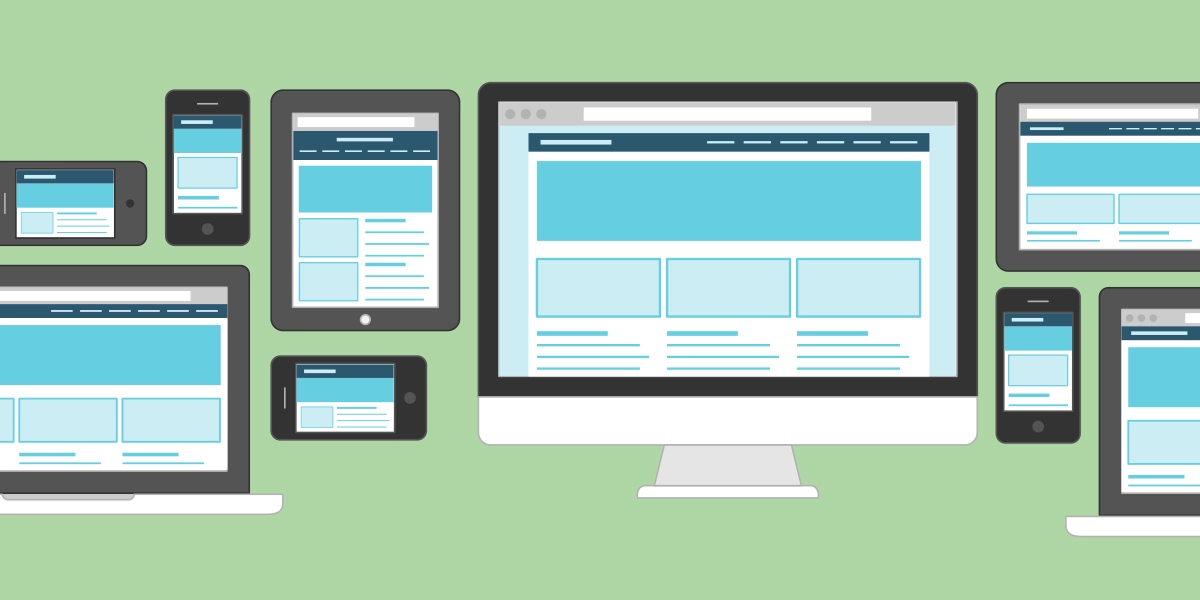
Responsive web design is a type of web design that is designed to respond to the size of the user’s device. It is designed to be flexible and adaptable to different screen sizes and devices. This type of design ensures that the website is displayed correctly regardless of the size of the device. Responsive web design is becoming increasingly popular as it allows for a seamless user experience across multiple devices.

the Different Types of Web Design by Zan Design

Interested in hiring Zan Design for your next project?
Contact them here

Mobile-first design

Another type of web design is mobile-first design. This type of design focuses on delivering an optimized user experience on mobile devices. It takes into account the smaller screens, limited bandwidth, and slower loading times of mobile devices. Mobile-first design uses fewer images and lots of whitespace to ensure the website is optimized for mobile devices.

Parallax web design

Parallax web design is another popular type of web design. This type of design uses the parallax effect to create the illusion of depth and movement on the page. Parallax scrolling can be used to create interesting and engaging animations that draw the user in. This type of design is often used to create storytelling experiences on web pages.

Material design

Material design is a type of web design that was created by Google. It uses motion and depth to create a more natural and intuitive user experience. Material design also uses layers, colors, and type to create a more modern and streamlined look. This type of design is often used to create more interactive experiences on websites.

Single page websites

Single page websites are becoming increasingly popular as they allow for a more streamlined user experience. Single page websites are designed to provide all the information the user needs on one page. This type of design is often used for portfolios, landing pages, and other types of websites that don’t require a lot of content.

Flat web design

Finally, we have flat web design. Flat web design uses simple shapes and colors to create a more minimalistic look. This type of design is often used to create a modern and clean look for websites. It is often used for corporate websites and other types of websites that don’t require a lot of content.

Conclusion

As you can see, there are many different types of web design and each has its own advantages and disadvantages. When choosing a type of web design for your website, it’s important to consider your target audience and the purpose of your website. It’s also important to consider the amount of content and features you need on your website. By understanding the different types of web design, you can make an informed decision on which type of design is best for your website.

What is Responsive Web Design

What is Responsive Web Design

Website resources

What is Responsive Web Design

Responsive web design (RWD) is a web design approach that focuses on crafting websites to provide an optimal viewing experience—easy reading and navigation with a minimum of resizing, panning, and scrolling—across a wide range of devices (from desktop computer monitors to mobile phones).

Responsive web design is accomplished through the use of a combination of flexible grids, layouts, images and an intelligent use of CSS media queries. Responsive websites are designed to automatically adjust to the size of the device it is being viewed on, creating a seamless user experience regardless of the device or screen size.

Importance of Responsive web site design by ZanDesign

Interested in hiring Zan Design for your next project?
Contact them here

The Benefits of Responsive Website Design

1. Increased Mobile Traffic:

With the increasing number of people accessing websites from mobile devices, having a responsive website has become essential for businesses in order to stay competitive. Responsive design allows businesses to provide an optimal user experience for their mobile visitors, which leads to increased engagement and conversions.

2. Improved SEO:

Responsive websites are better optimized for search engines, as they only have one version of the website, which makes it easier for search engine crawlers to determine the relevancy and context of the content. This helps to improve the website’s overall SEO performance.

3. Cost Savings:

Responsive websites are cost effective as they require less maintenance and development time as compared to a separate mobile website.

4. User Experience:

Responsive design provides an optimal viewing experience across all devices, allowing visitors to easily navigate and engage with the website’s content.

5. Cross-Device Compatibility:

Responsive websites are designed to be compatible with all devices and screen sizes, eliminating the need for separate versions of the website for each device.

Plugins for Making Your Site Mobile-Friendly

Superfly

Superfly is a great plugin for making your site mobile-friendly. It allows you to create custom mobile menus and can be used to optimize the user experience on mobile devices. It also has a drag-and-drop interface that makes it easy to customize the menu and make it look the way you want.

Jetpack

Jetpack is a WordPress plugin that provides a number of features such as enhanced security, performance, and customization. The plugin also includes a feature called “Mobile Theme” which enables you to create a mobile-friendly version of your website in just a few clicks.

Smush

Smush is a great plugin for optimizing images for mobile devices. It allows you to compress images and reduce their file size, making them easier to load on mobile devices. It also includes options for creating responsive images, so that images look good on all screen sizes.

AMP for WP

AMP for WP is a plugin that enables you to create AMP (Accelerated Mobile Pages) versions of your web pages. This makes it easier for mobile users to access your content, as AMP pages load faster than regular web pages. It also includes a variety of customization options, so you can tailor the AMP pages to your site’s design.

WP Mobile Menu

WP Mobile Menu is a plugin that helps you create a mobile-friendly navigation menu. It allows you to customize the menu so that it looks good on all devices, and it includes options for creating responsive menus.

Max Mega Menu

Max Mega Menu is a plugin that helps you create a mobile-friendly mega menu. It includes options for customizing the menu’s appearance and for creating responsive layouts. It also has a drag-and-drop interface, so you can easily create the menu you want.

Hummingbird

Hummingbird is a plugin that helps you speed up your website on mobile devices. It includes options for optimizing images, minifying files, and caching pages. It also has a variety of customization options, so you can tailor the optimization to your site’s needs.

Touchy

Touchy is a plugin that helps you create a mobile-friendly menu. It includes options for customizing the menu and for creating responsive layouts. It also has a drag-and-drop interface, so you can easily create the menu you want.

WPTouch Pro:

WPTouch Pro is a WordPress plugin that helps you to quickly create a mobile-friendly version of your website. The plugin features an extensive range of customization options and advanced features such as mobile-specific themes, menus, and widgets.

WP Mobile Detect

WP Mobile Detect is a WordPress plugin that allows you to detect when a visitor is using a mobile device and display an optimized mobile version of your website. The plugin includes a number of features such as mobile-specific menus, slideshows, and galleries.

Conclusion

Responsive web design is an essential part of creating an optimized user experience for visitors on all devices. Responsive websites offer a number of benefits such as increased mobile traffic, improved SEO, cost savings, and improved user experience. If you are looking to create a responsive website, there are a number of plugins available that can help you to quickly and easily create a mobile-friendly version of your website.

The Latest Web Design Trends and Strategies

The Latest Web Design Trends and Strategies

Website resources

The Latest Web Design Trends and Strategies

The web design industry is a constantly evolving and ever-changing landscape. As technology advances, so too do the web design trends and strategies used by developers and designers to create stunning and effective websites. In order to stay ahead of the curve, it is important for those in the web design industry to stay up to date with the latest trends and strategies.

Zan Design Boulder CO based web design firm

Interested in hiring Zan Design for your next project?
Contact them here

Minimalism in Web Design

In 2021, we are seeing a shift towards minimalism in web design, with a focus on simple, clean layouts and user-friendly navigation. This trend, when done correctly, can help create a more pleasant and efficient user experience, which is key to keeping users engaged and coming back to your website. To achieve this, designers should use fewer elements on the page, opt for muted colors and consistent typography, and make sure to prioritize the user’s journey above all else.

Animation in Web Design

Animations are also becoming increasingly popular in web design. By using subtle animations and transitions, designers can create a more dynamic and interactive experience for users. This is particularly useful for providing visual cues for navigation and helping to guide users through the site. Animations can also be used to add depth and interest to a page, and to communicate ideas or concepts in a more engaging way.

Responsive Design in Web Design

Responsive design is another web design trend that is gaining traction in 2021. With the ever-increasing number of devices, it is essential that websites are optimized for multiple devices and screen sizes. Responsive design ensures that the website looks great and functions properly no matter what device it is being viewed on. This also helps to ensure that users have a positive experience regardless of the device they are using, as well as helping to improve the website’s search engine rankings.

Images and Videos for Web Design

The use of visuals is also becoming more important in web design. Visuals can be used to convey a message or concept more effectively, and can be used to add personality and interest to a website. Images and videos are becoming increasingly popular, and designers should look to incorporate them into their designs. Additionally, the use of illustrations, iconography, and other visuals can help to create a unique and memorable experience for users.

Micro-Interactions

Finally, the use of micro-interactions is also becoming increasingly important in web design. These are small animations or interactions that occur when a user interacts with a website, such as an animation when a user hovers over an element or the menu expanding when clicked. These small interactions can help to improve the user’s experience, as well as helping to make the website more engaging and memorable.

These are just some of the latest web design trends and strategies that are being used in 2021. As technology advances, new trends and strategies will continue to emerge, so it is important for those in the web design industry to stay up to date in order to create the best possible experience for users.